HaloPSA

End-of-life data
on your HaloPSA assets

endoflife.ai EOL Risk is an integration for HaloPSA that writes end of support, end of life, the EOL Risk Score™ and an exploited-and-unpatchable flag onto each Halo asset, with the vendor source beside every date. Assets past end of life can open a ticket against their customer and site, so upgrade work runs through the queue, SLAs and billing you already use. Open source (MIT), plain Node.js, and it runs on your own schedule and infrastructure.

What it does

Once a day it reads each asset's operating system and the software rows on its Software tab, matches them to endoflife.ai lifecycle data for 700+ products, and writes the answer back onto the asset. The asset shows its worst row; a detail field lists every operating system and software row with its own verdict.

Nothing is guessed. A title we do not track is reported as not tracked, and an operating system recorded too loosely to name a release, such as a bare "Windows 10", is reported as needs a more specific version instead of being given a date that might be wrong.

The twelve fields
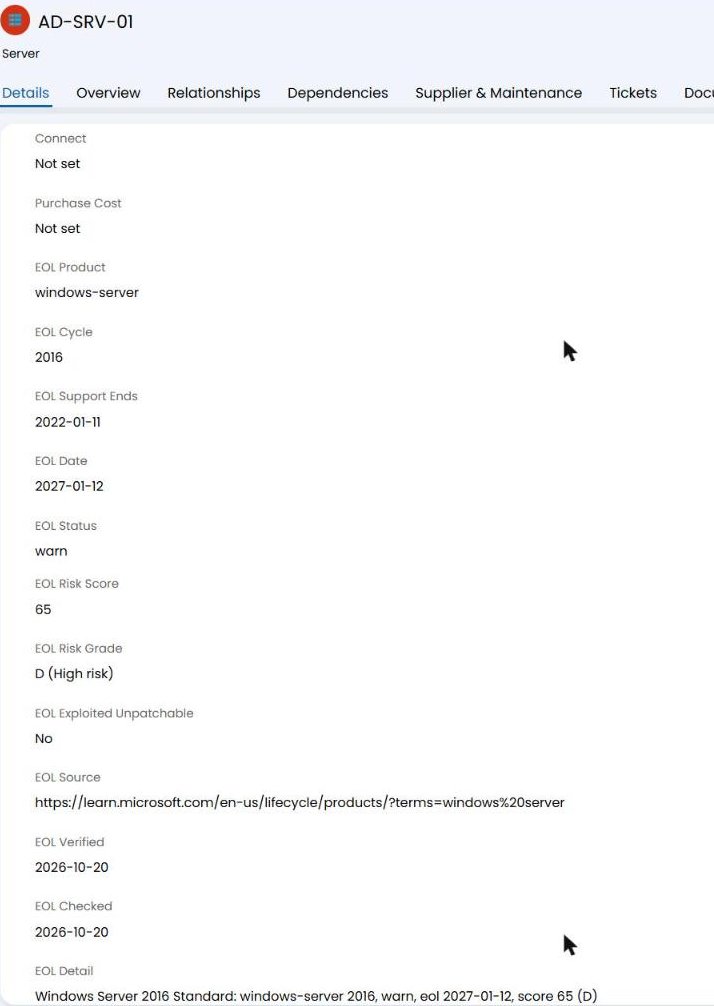
EOL Product
The endoflife.ai product the asset was matched to.
EOL Cycle
The release line matched, for example a Windows Server year or a SQL Server version.
EOL Support Ends
The vendor's end of active support, when the vendor publishes one.
EOL Date
End of life or end of security fixes. A month when the vendor names only the month.
EOL Status
active, warn (ends within 12 months), eol, needs a more specific version, version not tracked, or not tracked.
EOL Risk Score
The EOL Risk Score™ from 0 to 100. Higher means more dangerous to keep running. Methodology.
EOL Risk Grade
The letter grade A to F with its label.
EOL Exploited Unpatchable
Yes when the release is on the Exploited & Unpatchable list: actively exploited according to CISA, with no fix coming.
EOL Source
Where the date comes from: the vendor's own lifecycle page where we read it there, otherwise the upstream dataset, named as such.
EOL Verified
The day endoflife.ai last verified the date at that source.
EOL Checked
The day the integration last evaluated the asset.
EOL Detail
One entry per operating system and software row, each with its own verdict.
A HaloPSA server asset's Details tab with the twelve EOL fields filled in: product, cycle, support end, end of life, status, score, grade, exploited flag, vendor source, verified and checked days, and the detail line
The EOL fields on a demo server in a HaloPSA test instance, after one run (screenshot taken 2026-10-20; values change as vendor dates and scores change).

Set it up

The full guide, with every command and option, is the README in the repository: github.com/endoflife-ai/halo-integration. In short:

Step 1
In Halo, under Configuration → Integrations → Halo API → Applications, register an application with the Client Credentials method and five permissions: read:assets, edit:assets, read:tickets, edit:tickets, read:customers.

Step 2
Create the twelve fields once under Configuration → Asset Management → Asset Fields (type Text). Creating a field is configuration, so through the API it needs Halo's admin API permission; the recommended path keeps the application to the five permissions above and the setup script only attaches the fields to your asset types.

Step 3
Put the client ID, client secret and your endoflife.ai API key in halo.env, attach the fields, then preview before anything is written.

shell
git clone https://github.com/endoflife-ai/halo-integration
cd halo-integration
node setup-fields.mjs
node sync.mjs --dry-run --report run.json
node sync.mjs --tickets --ticket-type <id>

Schedule the last line once a day. Only changed values are written, and a ticket is never opened twice for the same asset and release.
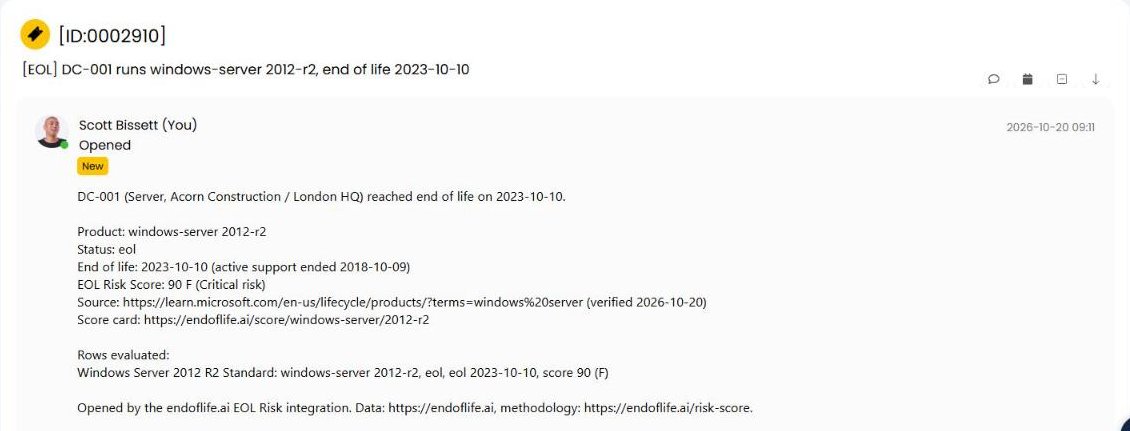
A HaloPSA ticket opened by the integration for a demo server past end of life, listing the product, status, end-of-life date, support end, score, vendor source with its verified day, and the score card link
A ticket opened for a demo server past end of life, in the same test instance (2026-10-20).

Fits inside your Halo limits

Halo allows a fixed number of API calls per five minutes for each tenant host, shared by every integration calling it. This one stays well below that ceiling, pauses when it reaches its own lower limit, and backs off when Halo asks, so your RMM sync and other integrations keep their headroom. A run costs about one call per asset plus one write per fifty changed assets.

Your data stays in Halo Only product names and version strings are sent to endoflife.ai. Asset names, customers, sites and users never leave your environment, and endoflife.ai stores nothing about your assets.
API key The integration calls the endoflife.ai API. From November 16, 2026 every request needs a key: get a free key, which does not expire, or see the paid tiers for a larger estate. Questions, or a date you believe is wrong: [email protected]. Corrections are published.

Not on HaloPSA?

The same data runs our Dynatrace, Datadog and Grafana integrations and the developer API.

All integrations Developer API Risk Score methodology